How to Set Up a Lionel Train Set: Complete Beginner's Setup Guide
May 31, 2026
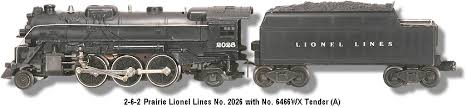
How do you set up a Lionel train set? Whether you just unwrapped a Lionel LionChief starter set, inherited an old Lionel collection, or bought your first O-gauge set as an adult getting into the hobby, the first setup can feel intimidating. This vibetrains.com guide walks you through Lionel train set setup step-by-step — from unboxing to running your first train, with troubleshooting for every common first-time issue.
Quick Answer: Lionel Train Set Setup in 5 Steps
1. Unbox carefully — locomotive, cars, track, transformer, manual. 2. Assemble the FasTrack loop — sections snap together with locking pins. 3. Connect the transformer to the dedicated power track piece. 4. Place the locomotive and cars on the track, making sure wheels seat on both outer rails. 5. Power on the transformer, set throttle to low, and run. For LionChief, also pair the smartphone app via Bluetooth. Total setup time: 15-30 minutes for a basic loop.
What's In a Lionel Train Set Box
A typical Lionel LionChief or LionChief Plus 2.0 starter set includes: one locomotive (steam or diesel), three to five rolling stock cars (freight or passenger), 12-16 sections of Lionel FasTrack forming a closed oval, one power supply with controller (Lionel calls this a "Power Supply" or "PowerHouse"), one wired controller (on non-Bluetooth sets), an instruction manual, and a quick-start guide. LionChief and LionChief Plus 2.0 sets also include a small card with the smartphone app QR code. Verify all pieces are present before assembling.
How to Assemble FasTrack
Lionel FasTrack is the modern Lionel track system with integrated plastic roadbed. Assembly is straightforward: each section has metal pins on one end and matching pin sockets on the other. To connect, align the pins with the sockets and push the sections together firmly until they click. Plastic locking tabs on the underside hold the sections in place. To disconnect, lift one section straight up — never twist. For a basic starter set oval, you'll have curved sections (typically O-31 or O-36) and straight sections that combine into a closed loop. One of the sections will have wire connection points underneath — that's your power-feed track. For more on track options, see our FasTrack vs Atlas O vs RealTrax comparison.
How to Connect the Transformer
The Lionel transformer (the box with the throttle controller) connects to the power-feed track via a short cable with a plug at each end. Plug one end into the transformer output, the other into the power-feed track jack underneath. Verify the plug seats fully. Then plug the transformer's power cord into a standard wall outlet. Position the transformer where the cord won't be tripped over, ideally with the controller within easy reach of where you'll stand while operating. Don't power on yet — finish placing the locomotive first.
How to Place the Locomotive on the Track
Lift the locomotive carefully — modern Lionel locomotives are die-cast and heavier than they look. Position it over the track so that the wheels straddle the outer rails (the two parallel rails on either side), and the center pickup rollers contact the middle rail. Gently lower the locomotive straight down onto the rails. Verify all wheels are seated correctly by looking at it from the side — wheels should be flush with the rails on both sides. Repeat for each car, connecting them together via the magnetic or knuckle couplers. Lionel couplers connect by simply pushing two cars together until you feel them click.
How to Run Your First Lionel Train
With everything in place: turn on the transformer (there's usually an on/off switch on the back or top). The transformer will hum quietly — that's normal. The locomotive's headlight should illuminate immediately on power. Slowly advance the throttle. The locomotive will start moving — slowly at first, then faster as you advance the throttle. To stop, throttle back to zero. To reverse direction, throttle to zero, then press the direction button (or for older transformers, briefly cycle power off and back on). For LionChief models, you can also reverse using the app or the included remote.
How to Pair the LionChief Bluetooth App
For LionChief and LionChief Plus 2.0 sets, the smartphone app provides full control without a separate remote. Download "Lionel LionChief" from the App Store (iOS) or Google Play (Android). Open the app. Tap the connect/scan button. Your locomotive should appear in the list within 10-15 seconds — tap its name to pair. Once paired, the app's control panel becomes active: throttle, direction, bell, whistle, sound effects, and lighting. The first pairing sometimes takes a minute; subsequent pairings take seconds. For complete Bluetooth troubleshooting, see our LionChief Bluetooth setup guide.
Common First-Setup Problems and Fixes
Locomotive won't move when I throttle up. Check that the transformer is plugged in, the power-feed cable is connected to the right track section, the locomotive's wheels are properly seated on the rails, and the locomotive's direction switch (under the cab on most models) is not set to "neutral." For LionChief, verify the locomotive is connected via the app or the remote is on the correct channel.
Locomotive runs in jerky bursts. Usually dirty wheels or dirty track. Wipe both with a clean cloth dampened with isopropyl alcohol. For ongoing maintenance, see our cleaning and maintenance guide.
Bluetooth app won't find my locomotive. Check track power (does the headlight come on?), toggle phone Bluetooth off and on, lift the locomotive off the track for 10 seconds and replace, then re-scan. Force-quit the app and reopen if needed.
Train derails on curves. Verify all FasTrack sections are fully seated together, the track is flat (not riding over a wrinkle in the rug), and the locomotive's wheelbase matches the curve diameter — some larger locomotives require O-42 minimum curves and won't track on tight O-31.
Cars decouple while running. Lift the car and re-seat the coupler firmly. If repeated, inspect the coupler for damage or debris.
How to Expand Beyond the Starter Set
Once your starter set runs reliably, expansion is straightforward. Lionel sells FasTrack extension packs (more straights, more curves, switches for sidings), additional locomotives and rolling stock, and accessories like lighted street lamps, operating crossings, and signal bridges. A typical first expansion: add four straight sections to lengthen the loop, then a pair of switches and a short siding so a second locomotive can wait while another runs. For full layout planning, see our 4x8 layout planning guide. Browse FasTrack expansion packs on Amazon for the most popular extensions.
Where to Set Up Your Lionel Train Set
For a temporary setup (around the Christmas tree, on a coffee table, in a kid's room), any flat surface works — carpet, hardwood, or a tabletop. For a more permanent layout, a 4x8 sheet of plywood mounted on folding legs or sawhorses gives you a stable base that you can move if needed. For a dedicated train room, see our ultimate vibe train room setup guide. The starter set works in all these contexts — your investment in track and locomotive transfers to any larger layout you build over time.
Frequently Asked Questions
How long does it take to set up a Lionel train set? A basic starter set takes 15-30 minutes for first setup. Subsequent setups (taking down and putting back up) take 5-10 minutes once you're familiar with the FasTrack assembly.
Do I need batteries for a Lionel train set? No. Lionel locomotives draw power from the track via the transformer; no batteries are required. The smartphone for LionChief Bluetooth uses its own battery, but the train itself is fully wired.
Can a child set up a Lionel train set? Yes, with adult supervision for the transformer wiring and power connections. Children 8+ can typically assemble FasTrack independently. Lionel is rated 14+ but the practical age is much lower with supervision.
Can I run my Lionel train on the carpet? Yes, but for best results lay the track on a flat firm surface (foam board, plywood, or a tree mat) on top of the carpet. Track sections on uneven carpet can flex and cause derailments.
What's the best Lionel train set for first-time buyers? The Lionel LionChief starter sets in the $199-$299 range offer the best beginner experience. For our top picks, see our best O-gauge starter sets guide.
Final Word
Setting up a Lionel train set is one of the easiest entry points into a serious hobby. Twenty minutes from box to running. A few months to a basic layout. A lifetime if you choose to stay. The starter set you assemble today is the same hobby that has captured generations of Americans — and the same hobby you can grow into for as long as you want. For more on what to do next, see our beginner's guide to vibe trains.
Newsletter
Weekly O-gauge tips & reviews
New reviews, layout ideas, and hobby news — straight to your inbox.